
Image to Anime Converter
Upload a photo, pick an anime style from the examples, and get an anime version of the same person, pet or couple in a few seconds.
1Reference images
Up to 1 · JPG, PNG or WebP, max 10MB each.
2Describe the change
2 credits
Trying an example fills in its photo and prompt; replace the photo with your own and edit the prompt if you like. The result keeps the shape of your photo. Each conversion uses the credits shown above the Generate button; new accounts start with free credits.
- Free credits to start
- Real examples of every style
- No watermark
Anime styles
The same photo in each style, with what the style looks like and the photos it suits. Try an example to load its photo and prompt into the converter, then swap in your own photo.
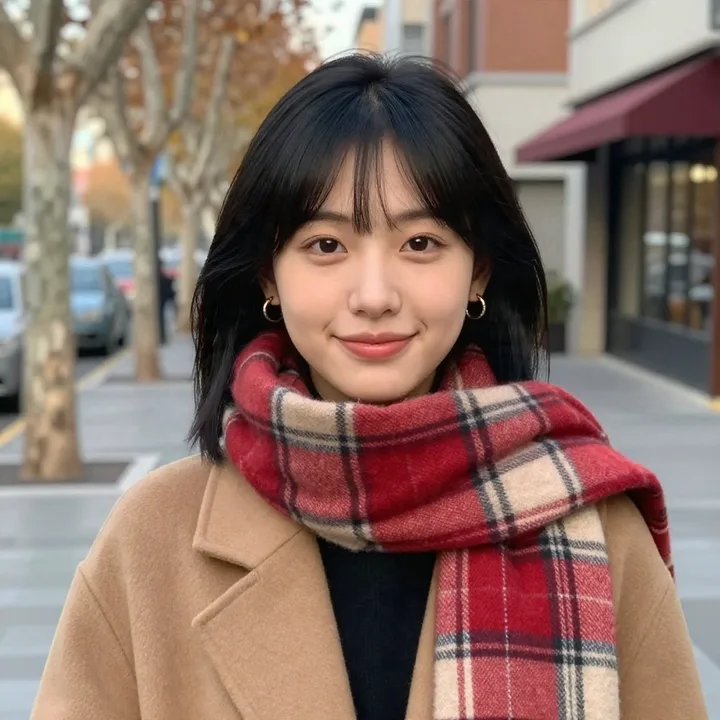
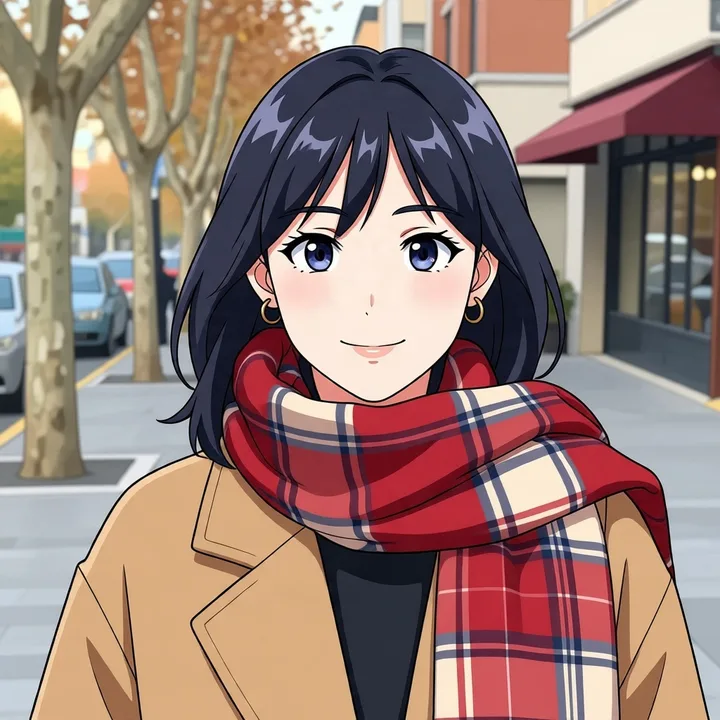
Modern anime
The look of current TV anime: crisp clean outlines, soft gradient cel shading, glossy hair highlights and vivid colors.
- Works best with
- Selfies, portraits and pets; most everyday photos.
- Less suited to
- Photos where you want a painted or vintage feel; pick watercolor or 90s cel instead.
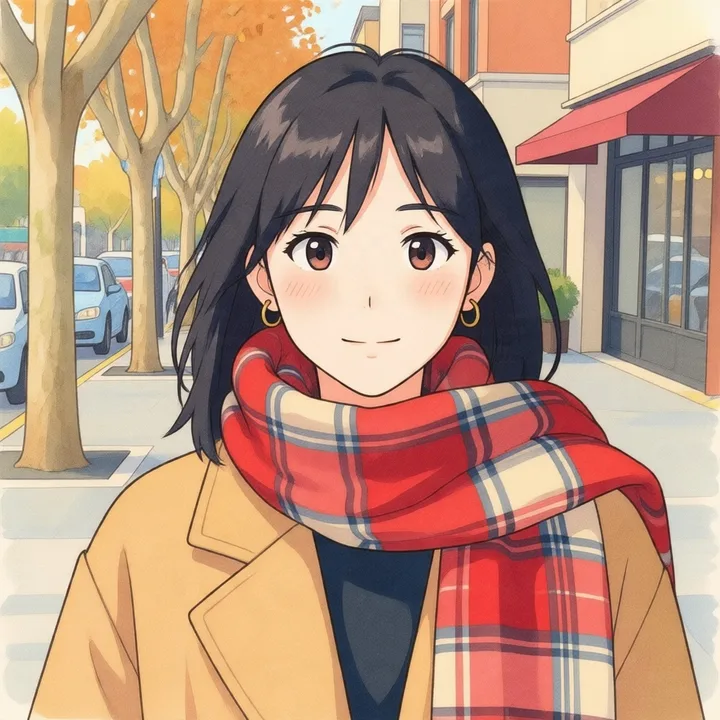
Watercolor anime
Soft painted shading, warm muted colors and detailed painted backgrounds, inspired by classic Japanese animated films.
- Works best with
- Outdoor photos, travel photos, pets and family pictures.
- Less suited to
- Night scenes and harsh city light, where the soft painted look loses its warmth.
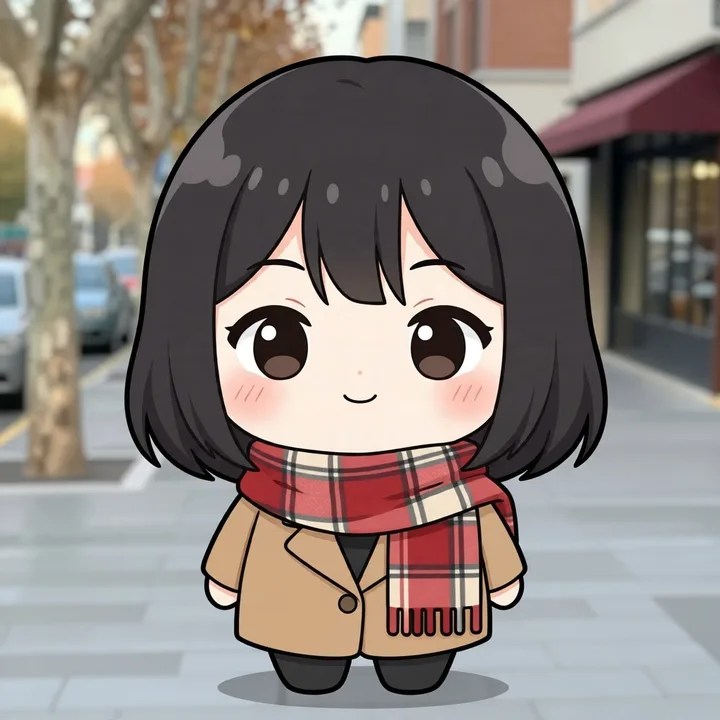
Chibi
Super-deformed characters: a big head on a small rounded body, simple eyes and a plain background.
- Works best with
- Full-body photos, pets, and stickers or emotes.
- Less suited to
- Photos where exact body proportions matter; chibi changes them on purpose.
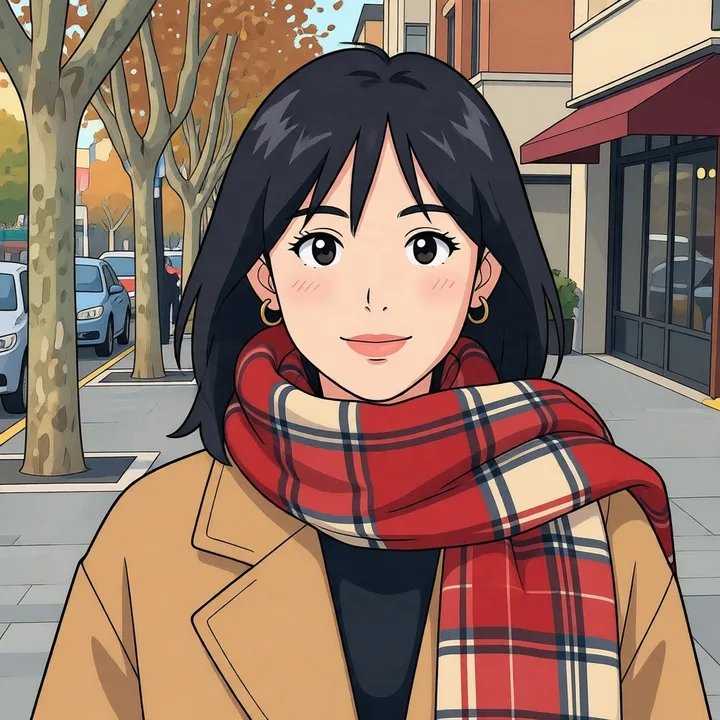
90s cel anime
A frame from a 1990s TV series: retro character design, hand-painted cels, flat colors, hard-edged shadows and film grain.
- Works best with
- Portraits and street or city photos; strong side light gives the clearest shadow shapes.
- Less suited to
- Very dark photos, where the flat colors lose the face.
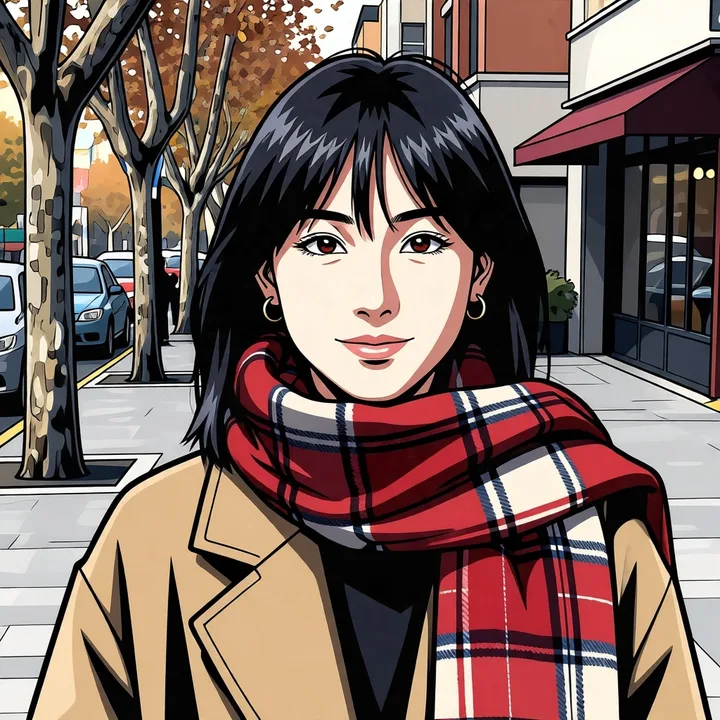
Shonen
Action series for a young male audience: bold angular lines, heavy black shadows and dynamic high-contrast shading.
- Works best with
- Sports, action and full-body photos; confident poses.
- Less suited to
- Soft, quiet portraits; watercolor or modern anime suit them better.
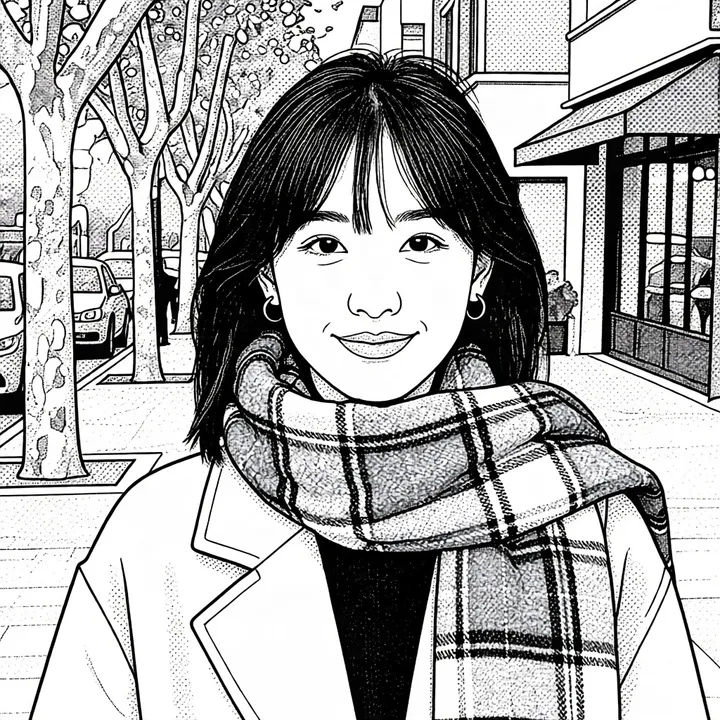
Manga line art
A printed manga page: black ink lines, screentone dots for shading and no color.
- Works best with
- Portraits with clear contrast; coloring pages and comic panels.
- Less suited to
- Photos where the colors matter, such as hair color or an outfit.
How to turn a photo into anime
Three steps in the browser, on a computer or a phone.
- 01
Upload your photo
A JPG, PNG or WEBP up to 10 MB. A sharp, evenly lit photo where the face is not tiny gives the closest likeness.
- 02
Pick an anime style
Pick a style from the examples below the tool. Its prompt fills the text box; add a detail if you want one, such as an outfit color or a background.
- 03
Generate and download
The anime version appears beside the controls in a few seconds. Download it as a PNG without a watermark; it is also saved to My Creations.
Anime portraits that still look like you
Many photo to anime tools return a generic anime face that looks like no one in particular. That happens when the model redraws the face from the style alone. Here every style prompt also says what to keep, so your anime portrait keeps your face.
What to keep, in every prompt
Each style prompt ends with the same instruction: keep each face, hair color and skin tone recognizable. The style changes the drawing, not the person.
Start from a clear face
Likeness depends most on the photo. A face that is sharp, evenly lit and turned toward the camera keeps more of its features. For an anime portrait, crop to head and shoulders before uploading.
Glasses, freckles and small details
Glasses, earrings, freckles and hair accessories are kept by default. If one goes missing, name it in the prompt, for example "keep the round gold glasses", and generate again.
Anime avatars, pets and couple photos
Cartoon yourself, your pet or the two of you: the three kinds of photo people convert most.
Anime profile pictures
Cartoon yourself for Discord, X, Twitch or Steam. A square-cropped selfie gives a square result, ready to upload as an avatar.
Pets as anime characters
Dogs, cats and other pets convert well in the modern, chibi and watercolor styles. The prompt asks to keep fur color recognizable, so the result should still show your pet's breed, fur color and markings.
Couple and friend photos
Two or three people in one photo work when each face is clearly visible. Use it for an anniversary gift, matching avatars or a group picture in one anime style.
Photo to cartoon vs photo to anime
Cartoon and anime are two different looks. Knowing how they differ helps you pick the right tool for the result you want.
| Aspect | Anime | Cartoon |
|---|---|---|
| Origin | Japanese animation and manga | Western animation, comics and caricature |
| Faces | Large eyes with highlights, a small nose and mouth, a realistic head shape | Exaggerated features, rounder shapes, often a bigger head |
| Lines and shading | Thin clean lines, cel shading with hard-edged shadows | Thick outlines, flat color or soft 3D-style shading |
| Hair | Drawn in sharp clumps and strands with strong highlights | Drawn as one simple shape |
| Typical use | Avatars, fan art, character sheets, wallpapers | Caricatures, greeting cards, children's content, mascots |
Pick anime when you want the look of a Japanese series with the person still recognizable. For a Western cartoon or a 3D animated-film look, describe it in a prompt on the image to image tool.
Photos, formats and limits
What the converter takes, what it returns, and which photos give weaker results.
Input and output
- Input
- JPG, PNG or WEBP, up to 10 MB per photo
- Output
- A PNG in the same shape as your photo
- Time
- A few seconds per image
- Watermark
- None
- Privacy
- Uploaded photos are deleted within 48 hours; results stay in your history for 100 days
Photos that give weaker results
- Low light or heavy noise: the model has to guess at features it cannot see.
- Small faces in group shots taken from far away.
- Strong motion blur, or a face turned more than halfway from the camera.
- Sunglasses or masks that cover the eyes or mouth.
- Busy backgrounds in the chibi and manga styles, which simplify the scene.
Image to anime FAQ
Something not working? Write to us support@imagetoimage.io
Is this image to anime converter free?
New accounts get free credits, so you can convert your first photos without paying. After that, each conversion uses credits from a pack or plan; the cost shows above the Generate button before you start.
Is there a watermark on the result?
No. Results download as clean PNG files, whether you used free credits or paid ones.
Can I use the anime images commercially?
Yes, if you have bought credits or a plan. If you have only used free credits, the images you generate are for personal, non-commercial use. Commercial use must follow our Terms of Service and content policy.
Does it work on my phone?
Yes. The page works in mobile browsers: upload from your camera roll, pick a style and download the result. No app is needed.
Will my face be distorted?
Every style prompt tells the model to keep your face, hair color and skin tone recognizable, so the result should look like you. A sharp, evenly lit photo gives the closest likeness. Chibi changes body proportions on purpose.
Which anime styles can I choose?
Modern anime, watercolor anime, chibi, 90s cel anime, shonen and manga line art, each shown on the same photo in the style examples. You can also edit the prompt to describe a style of your own.
How is this different from an anime filter?
A filter changes colors and edges on top of the original photo. This converter redraws the whole picture as anime, with new line art, cel shading and anime proportions, while keeping who is in it.
If I wear glasses, will they still be there?
Usually, yes. The converter keeps what is in your photo, glasses included. If they go missing in a result, add "keep the glasses" to the prompt and generate again.
Do you store my photos?
Uploaded photos are deleted from our storage within 48 hours; we keep them only long enough to run the conversion. Results stay in your private history for 100 days and are never shown to other visitors.
Can I batch convert many photos at once?
Not yet: each run produces one anime image, and there is no batch queue. A run takes a few seconds, so a handful of photos is quick to convert one after another.
Which style looks most like a Studio Ghibli film?
Watercolor anime: soft painted shading, gentle natural light and a detailed painted background. It is inspired by that look and is not affiliated with Studio Ghibli.
How many pictures can I upload in one run?
One photo per run: the converter redraws that photo in the style you pick. A couple or group photo counts as one photo. To combine several pictures, such as an outfit or a background from another photo, use the image to image editor on the home page.
Turn your photo into anime
Popular anime styles with real examples, the face kept recognizable, free credits to start.